How Wallet as a Service Works
UTXOS Wallet-as-a-Service delivers secure, self-custody wallets without requiring users to manage seed phrases. This page explains the cryptographic architecture, key lifecycle, and recovery mechanisms.
Summary
- Non-custodial: Neither UTXOS nor your application can access user private keys
- Shamir’s Secret Sharing: Keys are split into 3 shares; any 2 can reconstruct the key
- Isolated signing: Keys exist only in memory inside a sandboxed iframe during signing
- Passkey support: Optional WebAuthn integration for hardware-backed security
- Full portability: Users can export mnemonic phrases and leave at any time
How is the wallet non-custodial?
UTXOS Wallet-as-a-Service is strictly non-custodial. The complete private key never exists on UTXOS servers or in your application.
The key exists only:
- Momentarily during signing
- In memory inside an isolated iframe
- On the user’s device
The iframe runs on a separate domain from your application with its own origin. Modern browser security partitions storage and memory across origins, preventing your application from accessing the iframe’s contents.
How are keys managed?
Key Generation
When a user creates a wallet:
- The iframe generates a cryptographically secure private key
- A mnemonic phrase is derived from the key
- Public addresses and keys are derived for supported chains
- The user creates authentication credentials (passkey or password + recovery question)
- The key is split into three shares using Shamir’s Secret Sharing
Shamir’s Secret Sharing
Shamir’s Secret Sharing is a cryptographic algorithm that splits a secret into multiple shares. Any subset of shares (threshold) can reconstruct the original secret, but fewer shares reveal nothing.
UTXOS uses a 2-of-3 scheme:
| Share | Location | Encryption |
|---|---|---|
| Device share | User’s browser (iframe storage) | Passkey or spending password |
| Auth share | UTXOS servers | Encrypted, requires valid JWT to retrieve |
| Recovery share | UTXOS servers | Passkey or recovery answer |
Any two shares can reconstruct the private key. This means users can recover their wallet if they lose access to one share.
Share Protection
Device Share
The device share is stored locally in the iframe and protected by one of:
- Passkey (recommended): Uses WebAuthn PRF extension to derive an encryption key from platform authentication (Touch ID, Face ID, Windows Hello)
- Spending password: User-chosen password encrypts the share
The device share never leaves the user’s device or the iframe origin.
Auth Share
The auth share is encrypted and stored on UTXOS servers. Retrieval requires:
- A valid JWT from the user’s authentication session
- Row-level security verification
UTXOS cannot decrypt the auth share. The encryption key is derived from user credentials.
Recovery Share
The recovery share enables wallet recovery on new devices. It is protected by:
- Passkey (recommended): Same passkey that protects the device share
- Recovery question/answer: User-chosen question with a secret answer that encrypts the share
UTXOS does not know the user’s recovery answer. If a user forgets both their passkey and recovery answer, the wallet cannot be recovered.
How does transaction signing work?
When your application requests a signature:
- Transaction sent: Your app sends the unsigned CBOR transaction to the iframe via
@utxos/sdk - JWT validation: The iframe retrieves the auth share using the user’s valid session token
- Device share decryption: The user authenticates (passkey or password) to decrypt the device share
- Key reconstruction: The iframe combines auth share + device share to reconstruct the private key in memory
- Signing: The private key signs the transaction
- Cleanup: The signature returns to your app; memory is immediately cleared
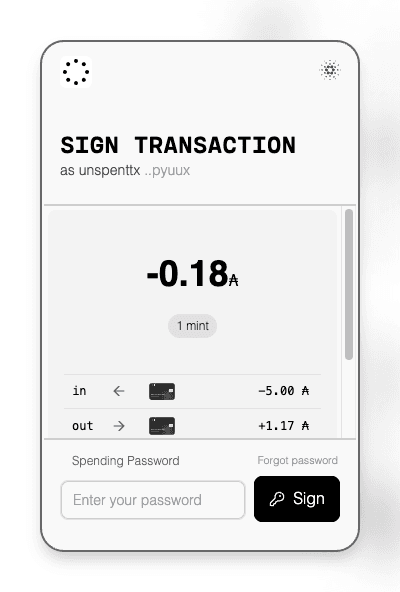
The entire process happens client-side. Your server never sees the private key.
How does wallet recovery work?
If a user accesses their wallet from a new device or forgets their spending password:
- Initiate recovery: User starts the recovery flow in the wallet interface
- Retrieve shares: The iframe fetches the auth share and encrypted recovery share using the user’s JWT
- Prove ownership: User authenticates with their passkey or provides their recovery answer
- Reconstruct key: The iframe combines auth share + recovery share
- Generate new device share: User creates a new spending password for the new device
- Update recovery: User sets a new recovery question/answer (or uses their existing passkey)
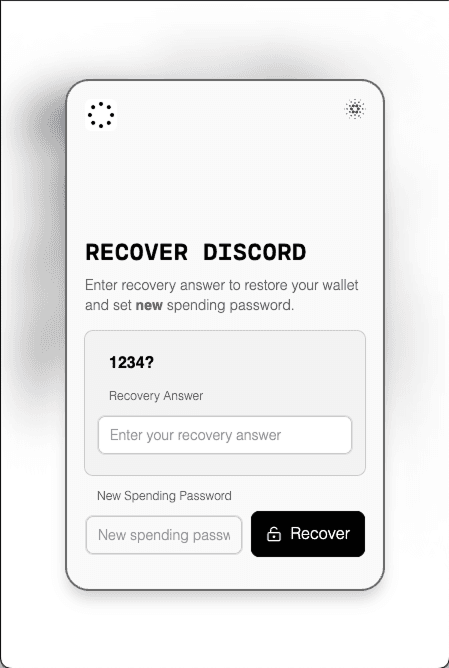
After recovery, the wallet address remains the same. The user can sign transactions normally.
Critical: If a user loses their passkey and forgets their recovery answer, the wallet is permanently inaccessible. UTXOS cannot recover wallets on behalf of users.
What are passkeys and how do they help?
For browsers and devices that support WebAuthn with the PRF extension, UTXOS uses passkeys for enhanced security:
| Benefit | Description |
|---|---|
| Hardware-backed | Keys stored in secure enclaves (TPM, Secure Enclave) |
| Phishing-resistant | Bound to specific origins; cannot be tricked |
| Convenient | Touch ID, Face ID, or Windows Hello instead of passwords |
If a device does not support passkeys, password-based flows remain available.
Passkey Requirements
- Browser support for WebAuthn PRF extension
- Compatible authenticator (platform or roaming)
- Modern operating system (iOS 16+, Android 9+, Windows 10+, macOS Ventura+)
How do users export their wallet?
Users can export their wallet at any time:
- User initiates export in the wallet interface
- Recovery flow verifies user identity
- The iframe reconstructs the private key
- A standard BIP-39 mnemonic phrase is displayed
- User can import this phrase into any compatible wallet
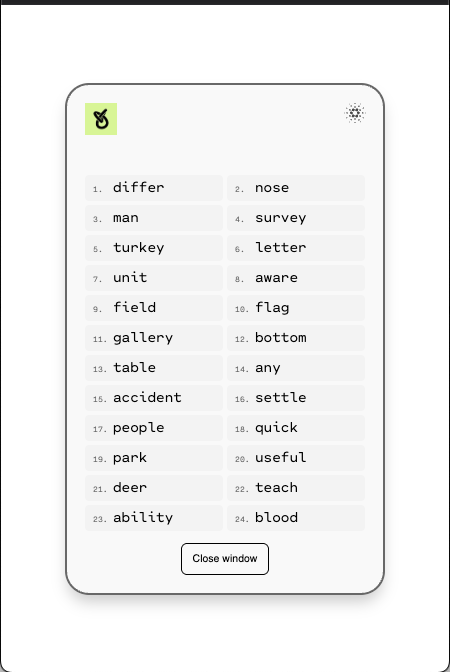
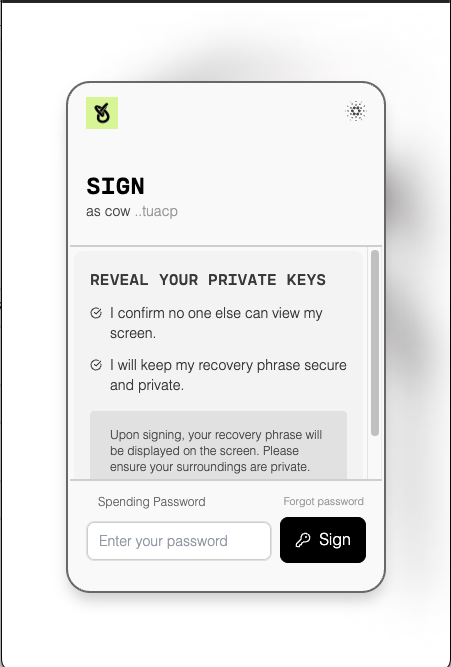
Users can also delete all their data from UTXOS servers at any time.
What security threats does this architecture address?
| Threat | Mitigation |
|---|---|
| UTXOS compromise | Shares are encrypted; UTXOS cannot decrypt them |
| Application compromise | Iframe isolation prevents access to shares or keys |
| Device theft | Shares require authentication (passkey/password) to decrypt |
| Phishing | Passkeys are origin-bound; passwords require user vigilance |
| Share interception | TLS encryption; shares encrypted at rest |
Technical Specifications
| Component | Specification |
|---|---|
| Secret sharing | Shamir’s Secret Sharing, threshold 2-of-3 |
| Key derivation | BIP-39 mnemonic, BIP-32/44 HD derivation |
| Encryption | AES-256-GCM for share encryption |
| Authentication | OAuth 2.0 / OIDC with JWT tokens |
| Passkeys | WebAuthn Level 2 with PRF extension |
| Iframe isolation | Separate origin, sandboxed execution |
Next Steps
- User Wallet Integration - Integrate wallets into your application
- Developer-Controlled Wallets - Programmatic wallet management
- Authentication Providers - Configure social login
- Custom Branding - Match your application’s design