Cardano Developer-Controlled Wallets
This guide walks you through setting up developer-controlled wallets for Cardano, from project creation to signing and submitting transactions.
⚠️
Developer-controlled wallets must run on your backend. Never expose your Entity Secret or API key to client-side code.
Setup
Create a project
- Sign in to the UTXOS Dashboard
- Create a new project from the dashboard
- Note your Project ID from the project settings
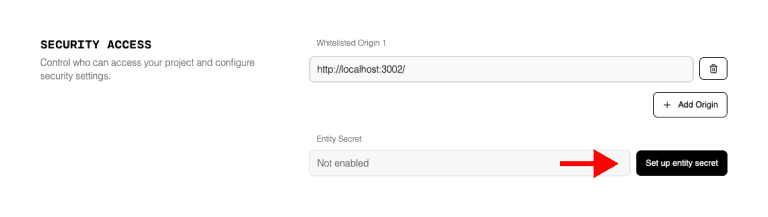
Configure Entity Secret
- Navigate to Dashboard > Project Settings > Security
- Click Generate Key Pair to create your Entity Secret
- Download and securely store the private key
- The public key is automatically saved to your project
🚫
UTXOS does not store your private key. If you lose it, you lose access to all wallets created with this Entity Secret.
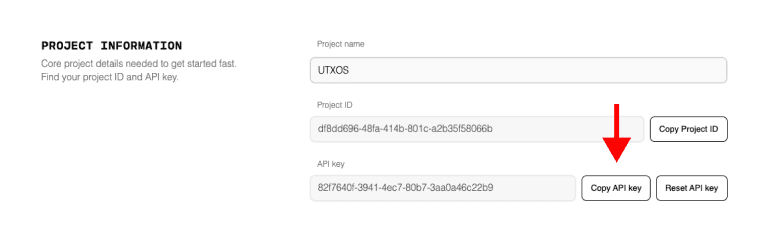
Get your API key
- Navigate to Dashboard > Project Settings
- Copy your API Key
Configure environment variables
Add these to your .env file:
# Required
NEXT_PUBLIC_UTXOS_PROJECT_ID=your_project_id
UTXOS_API_KEY=your_api_key
UTXOS_PRIVATE_KEY=your_entity_secret_private_key

# Provider (example: Blockfrost)
BLOCKFROST_API_KEY_PREPROD=your_blockfrost_api_key
Install the SDK
npm install @utxos/sdk @meshsdk/providerInitialize the SDK
import { Web3Sdk } from "@utxos/sdk";
import { BlockfrostProvider } from "@meshsdk/provider";

const provider = new BlockfrostProvider(process.env.BLOCKFROST_API_KEY_PREPROD);

const sdk = new Web3Sdk({
  projectId: process.env.NEXT_PUBLIC_UTXOS_PROJECT_ID,
  apiKey: process.env.UTXOS_API_KEY,
  privateKey: process.env.UTXOS_PRIVATE_KEY,
  network: "testnet", // or "mainnet"
  fetcher: provider,
  submitter: provider,
});
API Reference
Create a Wallet
// Basic creation
const walletInfo = await sdk.wallet.createWallet();

// With tags for organization
const walletInfo = await sdk.wallet.createWallet({
  tags: ["minting", "campaign-q1"]
});
Response:
{
  id: "2769cc4df6196d87f97344774e0f9db61fe54b4d0aabf26423687b89",
  address: "addr_test1qz...",
  publicKey: "ed25519_pk...",
  createdAt: "2024-01-15T10:30:00Z",
  tags: ["minting", "campaign-q1"]
}
Get All Wallets
// Paginated (default: 20 per page)
const { data: wallets, pagination } = await sdk.wallet.getProjectWallets();

// Fetch all pages
const allWallets = await sdk.wallet.getAllProjectWallets();

// Filter by tags
const mintingWallets = await sdk.wallet.getProjectWallets({
  tags: ["minting"]
});
Get a Specific Wallet
// Get wallet for Cardano
const { info, cardanoWallet } = await sdk.wallet.getWallet(
  "2769cc4df6196d87f97344774e0f9db61fe54b4d0aabf26423687b89",
  "cardano"
);

// Get wallet for Spark
const { info, sparkIssuerWallet } = await sdk.wallet.getWallet(walletId, "spark");

// Initialize both chains
const { info, cardanoWallet, sparkWallet } = await sdk.wallet.initWallet(walletId);
Wallet Operations
All operations require a provider for blockchain data. The examples below assume you have initialized the SDK with fetcher and submitter.
Get Change Address
const address = await cardanoWallet.getChangeAddress();
// "addr_test1qz..."
Get UTXOs
const utxos = await cardanoWallet.getUtxos();
// Array of UTXOs with amounts and assets
Sign a Transaction
// Full signature
const signedTx = await cardanoWallet.signTx(unsignedTx);

// Partial signature (for multi-sig or sponsorship)
const signedTx = await cardanoWallet.signTx(unsignedTx, true);
Sign Data
const signature = await cardanoWallet.signData(dataPayload);Submit a Transaction
const txHash = await cardanoWallet.submitTx(signedTx);Complete Examples
Send ADA
import { Web3Sdk } from "@utxos/sdk";
import { BlockfrostProvider, MeshTxBuilder } from "@meshsdk/core";

const provider = new BlockfrostProvider(process.env.BLOCKFROST_API_KEY_PREPROD);

const sdk = new Web3Sdk({
  projectId: process.env.NEXT_PUBLIC_UTXOS_PROJECT_ID,
  apiKey: process.env.UTXOS_API_KEY,
  privateKey: process.env.UTXOS_PRIVATE_KEY,
  network: "testnet",
  fetcher: provider,
  submitter: provider,
});

async function sendAda(walletId: string, recipient: string, lovelace: string) {
  const { cardanoWallet } = await sdk.wallet.getWallet(walletId, "cardano");

  const tx = new MeshTxBuilder({ fetcher: provider });

  tx.txOut(recipient, [{ unit: "lovelace", quantity: lovelace }])
    .changeAddress(await cardanoWallet.getChangeAddress())
    .selectUtxosFrom(await cardanoWallet.getUtxos());

  const unsignedTx = await tx.complete();
  const signedTx = await cardanoWallet.signTx(unsignedTx);
  const txHash = await cardanoWallet.submitTx(signedTx);

  return txHash;
}

// Send 10 ADA
const txHash = await sendAda(
  "your-wallet-id",
  "addr_test1qz...",
  "10000000"
);
Mint an NFT
import { ForgeScript, resolveScriptHash, stringToHex } from "@meshsdk/core";

async function mintNft(walletId: string, metadata: any) {
  const { cardanoWallet } = await sdk.wallet.getWallet(walletId, "cardano");
  const walletAddress = await cardanoWallet.getChangeAddress();

  // Create minting policy
  const forgingScript = ForgeScript.withOneSignature(walletAddress);
  const policyId = resolveScriptHash(forgingScript);
  const tokenName = "MyNFT";
  const tokenNameHex = stringToHex(tokenName);

  const tx = new MeshTxBuilder({ fetcher: provider });

  tx.mint("1", policyId, tokenNameHex)
    .mintingScript(forgingScript)
    .metadataValue(721, { [policyId]: { [tokenName]: metadata } })
    .txOut(walletAddress, [{ unit: policyId + tokenNameHex, quantity: "1" }])
    .changeAddress(walletAddress)
    .selectUtxosFrom(await cardanoWallet.getUtxos());

  const unsignedTx = await tx.complete();
  const signedTx = await cardanoWallet.signTx(unsignedTx);
  const txHash = await cardanoWallet.submitTx(signedTx);

  return { txHash, policyId, tokenName };
}
Batch Token Distribution
async function distributeTokens(
  walletId: string,
  recipients: Array<{ address: string; amount: string }>
) {
  const { cardanoWallet } = await sdk.wallet.getWallet(walletId, "cardano");

  const tx = new MeshTxBuilder({ fetcher: provider });

  // Add outputs for each recipient
  for (const { address, amount } of recipients) {
    tx.txOut(address, [{ unit: "lovelace", quantity: amount }]);
  }

  tx.changeAddress(await cardanoWallet.getChangeAddress())
    .selectUtxosFrom(await cardanoWallet.getUtxos());

  const unsignedTx = await tx.complete();
  const signedTx = await cardanoWallet.signTx(unsignedTx);
  const txHash = await cardanoWallet.submitTx(signedTx);

  return txHash;
}

// Distribute to multiple addresses
const txHash = await distributeTokens("your-wallet-id", [
  { address: "addr_test1qz...", amount: "2000000" },
  { address: "addr_test1qy...", amount: "3000000" },
  { address: "addr_test1qx...", amount: "5000000" },
]);
Provider Options
The SDK requires a fetcher and submitter to interact with the blockchain. Use any supported Mesh provider:
Blockfrost
import { BlockfrostProvider } from "@meshsdk/provider";

const provider = new BlockfrostProvider(process.env.BLOCKFROST_API_KEY);
Koios
import { KoiosProvider } from "@meshsdk/provider";

const provider = new KoiosProvider("preprod"); // or "mainnet"
Custom Provider
const customProvider = {
  fetchUTxOs: async (address) => { /* ... */ },
  submitTx: async (tx) => { /* ... */ },
  // ... other required methods
};
Error Handling
try {
  const { cardanoWallet } = await sdk.wallet.getWallet(walletId, "cardano");
  const signedTx = await cardanoWallet.signTx(unsignedTx);
  const txHash = await cardanoWallet.submitTx(signedTx);
} catch (error) {
  switch (error.code) {
    case "WALLET_NOT_FOUND":
      console.error("Wallet does not exist");
      break;
    case "DECRYPTION_FAILED":
      console.error("Entity Secret mismatch - check your private key");
      break;
    case "INSUFFICIENT_FUNDS":
      console.error("Wallet balance too low for this transaction");
      break;
    case "SUBMISSION_FAILED":
      console.error("Network rejected transaction:", error.message);
      break;
    default:
      console.error("Unexpected error:", error);
  }
}
Best Practices
- Store wallet IDs in your database for later retrieval
- Use tags to organize wallets by purpose (payments, minting, etc.)
- Monitor balances and set up alerts for low funds
- Log all transactions for auditing and debugging
- Implement idempotency to prevent duplicate transactions
- Use testnet for development before deploying to mainnet
Next Steps
- Entity Secret Security - Best practices for key management
- Transaction Sponsorship - Pay fees for your users
- Mesh SDK Documentation - Full wallet API reference